 quiki.io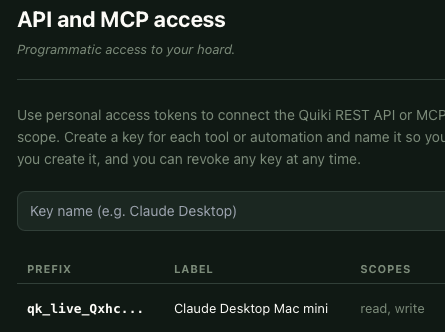
Quiki and your AI agent: five practical MCP workflows
The Quiki MCP server lets Claude and other AI agents read and add to your saved video library. Here are five practical workflows you can run today, using only the eight tools it ships with.
Earlier this year we introduced the Quiki MCP server, which connects your saved video library to Claude and other AI agents. Since then, the most common question has been simple: what do people actually do with it? This post answers that with five practical workflows, each built only from the tools the @quiki/mcp package really ships with.
The problem MCP solves is familiar. Your saved videos hold recipes, workouts, tutorials and ideas, but your AI assistant cannot see any of it. You end up copying transcripts into a chat by hand, one video at a time. With the MCP server, your agent can list your library, read a video's transcript and AI analysis, scan new links, and run bulk imports for you.
Connect your AI agent to Quiki in two minutes
- Get PRO. MCP access is included with any credit pack. See pricing.
- Create a key. In your account, open API keys, name the key and click Create key. You only see the key once, and you can revoke it at any time.
- Add the server. The dialog has a Copy config button. Paste it into Claude Desktop's
claude_desktop_config.json, into.mcp.jsonfor Claude Code (or runclaude mcp add), or wherever your MCP-capable agent keeps its server list:
{
  "mcpServers": {
    "quiki": {
      "command": "npx",
      "args": ["-y", "@quiki/mcp"],
      "env": { "QUIKI_API_TOKEN": "qk_live_..." }
    }
  }
}
There is no server for you to run. Your agent starts it when it needs it.
The eight tools
whoami: checks the key works and shows your tier.scan_urlandget_scan: scan a TikTok, YouTube or Instagram link, then check on it.list_recent_videosandget_video: skim your most recently scanned videos, then open one in full.bulk_import_estimate,bulk_importandget_bulk_import_status: price, start and follow a batch of links.
Five workflows to try
1. The weekly digest. Ask: "Use Quiki to list my 30 most recent videos and group them by topic. Then open the three cooking ones and write me a shopping list." The agent calls list_recent_videos (up to 100 at a time, without transcripts, so it can skim quickly), then get_video on the ones that matter for the transcript and analysis.
2. Scan and extract. Paste a link and ask: "Scan this TikTok with a deep scan and pull out the steps as a checklist." scan_url with mode: "deep" returns the transcript and AI analysis for TikTok. For YouTube, transcript_only gets the transcript. Instagram is always a deep scan. With wait: true the agent waits up to 90 seconds and gets the finished result in one call, which suits short videos. For longer ones it polls get_scan instead.
3. Import a list of links, safely. Give your agent a list and ask it to add them to Quiki. A well-behaved agent runs bulk_import_estimate first: it reports duplicates you already have, links that are not a single video (profile, channel and playlist links, for example), the credit cost, and whether your balance covers it. Then bulk_import starts the job (up to 500 links per call, so larger lists are split), and get_bulk_import_status follows progress. Duplicates cost nothing, and skipped counts TikTok links that were deleted or made private before scanning.
4. Photo posts too. Not everything you save is a video. For TikTok photo carousels, get_video returns the images instead of a transcript, so the agent can still describe or catalog them.
5. Your own tools. Because get_video returns the full transcript, you can feed your library into your own notes, a research doc, or a question-and-answer setup that searches across everything you have saved.
What it costs
Scans made through MCP use credits from the same balance as the app. Fast scans cost the least and deep scans cost more; the MCP page lists the cost of each mode. Reading your library with list_recent_videos and get_video does not scan anything. For a batch, bulk_import_estimate tells you the exact cost before anything starts.
Why we built it
We use Quiki with our own agents every day, and we wanted the same thing our users want: an assistant that already knows what you saved. MCP keeps that simple. Your library stays in Quiki, and your agent reads it when you ask.
Try it now
Read the full setup and tool reference on the MCP page, create a key in your account, and ask your agent what you saved this week. Got a big backlog to bring in first? See Import your whole library. Curious what the analysis your agent reads looks like? Read Summaries you will remember.
Your saved videos miss you. Go find them.
Join the creators, marketers, and agencies using Quiki.io to organize their video hoard.