 quiki.io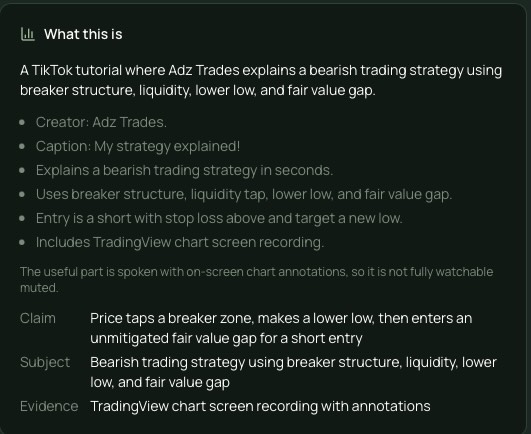
Summaries you will remember: a new detailed analysis in Quiki
We rebuilt Quiki's detailed analysis around one question: will this help you find and use the video again later? It now opens with what the video is, the key facts, and how to watch it, in about ten seconds of reading.
Quiki's detailed analysis has a new job. Instead of grading a video like a marketing consultant, it now writes AI video summaries built for the person who saved the video: what it is, the facts worth remembering, and how to watch it. It reads in about ten seconds, and it makes the video easier to find again months later.
The old detailed analysis dates from when Quiki had an agency plan. It asked the AI for hook effectiveness, retention tactics, viral potential, posting strategy and target demographics. That is useful if you make or sell content. It is not much use if you saved a recipe in March and want to know, today, whether it is the one with the miso butter.
Quiki is for the person who saved it. So we rewrote the analysis around one question: will this help you recognize, find and use the video again?
What you see in the Detailed tab
Open a video that has had a deep scan and tap the Detailed tab. You will see a card headed What this is:
- One sentence on what the video actually is. Not a teaser, a plain description.
- Up to six short facts. The things you would want when deciding whether to open it again.
- A line on how to watch it. Whether it works with the sound off, and whether the useful part is spoken or on screen.
- Type-specific details. A recipe can list the dish, ingredients, time and servings. A workout can list the exercises, sets and equipment. A product video can list the product, brand, price and verdict. Only details the video actually gives are filled in.
That is it. No scores, no strategy, no advice for the creator.
The example on our homepage is a real scan of a runner's commentary video: one line on who is talking and which shoe he is discussing, four facts, a note that you need the audio for the numbers, and three details (athlete, shoe, claimed advantage).
Smarter search, without the clutter
The analysis also collects material you never see on screen: the named things in the video (brands, places, people, dishes, songs, products), the questions it answers phrased the way you would type them, and a set of keywords. We keep that out of the Detailed tab on purpose, because it would bury the few lines you actually need.
But your search can see it. Quiki's search already reads everything in a video's analysis, so all of that hidden material helps a saved video turn up for the words you remember. In our own testing, videos became findable for terms like "hot air balloon" and "horseback riding" that appeared nowhere in their title, caption, hashtags or transcript. The analysis saw them on screen, and search picked them up.
It does not make things up
We gave the AI strict rules, and we tested them against real scans:
- No transcript, no claims about what was said. If nobody could hear it, the analysis does not describe it.
- No guessing at outcomes. Two names in a caption do not tell you who finished first, so the analysis will not say.
- Thin source, short answer. When there is little to go on, it describes the post itself rather than inventing what might be in it.
The same short write-up now appears in the Overview for Instagram photo posts and carousels, built from the caption and hashtags. There is more on that in Instagram photos and carousels.
A few details
- Deep scans only. The Detailed tab comes with a deep scan, which uses credits. See pricing.
- TikTok and Instagram videos. YouTube videos get an AI summary but no detailed analysis yet.
- Older videos keep their old analysis. Anything scanned before this change still shows what it had. New deep scans get the new format.
- Folders still fill themselves. The analysis also picks a category, so videos keep landing in the right folder.
Why we built it
Quiki exists so you can finally find the videos you saved. Every part of a scan should serve that. The old analysis was spending the richest signal we have, what was said and what was on screen, on critique that nobody saving a video for themselves ever asked for. Now that signal goes into a summary you can read at a glance and into search that works harder behind it.
Try it now
Deep scan a TikTok or Instagram video you saved, then open the Detailed tab. If you are still building your library, here is every way to save a video to Quiki, or see how to use Quiki from the start.
Your saved videos miss you. Go find them.
Join the creators, marketers, and agencies using Quiki.io to organize their video hoard.