 quiki.io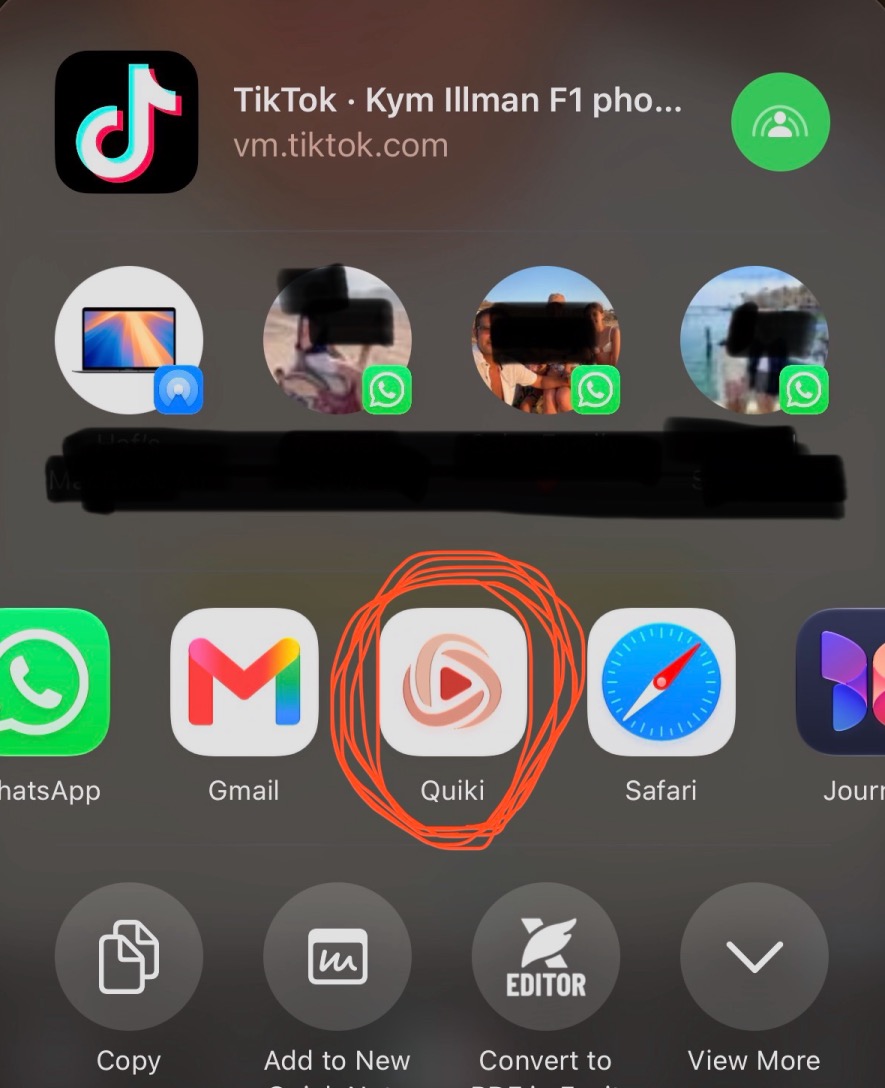
How to save videos to Quiki in one tap, on any device
There are four ways to get a video into Quiki: the iPhone share sheet, the Android share sheet, the Chrome extension, and pasting a link. Here is how each one works, and which to use when.
The fastest way to save videos to Quiki is to never copy a link at all. On your phone, you tap share and tap Quiki. On your computer, you click one button in Chrome. And when a link is all you have, you paste it. Here is every route, and they all end in the same searchable library.
The whole point of Quiki is that you can find a saved video again months later. That only works if saving it in the first place takes no effort. If you have to copy a URL, switch apps and paste, you will skip it on the day it matters. So there is a way in for each place you watch.
Save videos to Quiki from your iPhone
The Quiki iPhone app adds Quiki to your iOS share sheet. The Send to Quiki page has short screen recordings of each one.
- TikTok: tap the share arrow, scroll the share sheet across until you see Quiki, then tap Send to Quiki.
- Instagram: tap the paper plane under the Reel, tap More, then choose Quiki.
- YouTube: tap Share under the Short, tap More, then choose Quiki.
The link is captured and queued the moment you tap, so you can close the sheet and keep scrolling. It works from Safari too: open a TikTok or YouTube link in the browser and share it the same way.
Tip: scroll to the end of the app row, tap Edit Actions, and move Quiki into your Favorites so it is always in view.
Download Quiki on the App Store.
From your Android phone
The Quiki Android app works the same way.
- Install Quiki from Google Play and sign in.
- In TikTok, Instagram or YouTube, tap Share. If Quiki is not in the first row, tap More to open the full Android share sheet.
- Choose Send to Quiki. The video is queued and filed in your library, and you can keep scrolling.
From Chrome on your computer
Send to Quiki is our Chrome extension. Install it and connect it to your account once. After that:
- Open a video on TikTok, Instagram or YouTube, click the Quiki button in the toolbar, then Send to Quiki.
- Or right-click any video link and choose Send to Quiki.
The video is queued the moment you click, the same as pasting the link. Send to Quiki is built and tested for Chrome. Edge and Brave can install extensions from the Chrome Web Store, so it usually works there too. Safari and Firefox are not supported yet. The full story is in Send to Quiki for Chrome.
Paste a link, including Copy link URLs
Sometimes a link is all you have, say one a friend texted you. In Quiki, open Scan a video, paste it into the box and tap Scan video. Not signed up yet? The scan box on the How to use Quiki page lets you try a TikTok or YouTube link first.
You do not need to tidy the link up first. Quiki accepts the formats the apps themselves hand you:
- TikTok's Copy link short links, as well as full video URLs.
- Instagram's Share links, plus Reel and post links copied from the address bar. For a Share link, Quiki follows Instagram's redirect to find the post. If Instagram answers with a login page instead, Quiki will ask you to copy the link from your browser's address bar.
- YouTube watch links, Shorts links and youtu.be share links.
One thing to watch: copy the link to the video, not the creator. A profile or channel link is not a video. Quiki will tell you so and open a short guide (tap Show me how to see it again): open the video itself, tap Share, then tap Copy link.
A few things worth knowing
- Instagram needs credits wherever you send from. TikTok and YouTube quick scans work on the free plan. See pricing.
- Every route lands in the same library. A Reel you shared from your phone and a TikTok you sent from Chrome end up side by side, filed into folders and searchable.
- For a big backlog, use bulk import. Sending one video at a time is for new saves. To bring across everything you saved before Quiki, read Import your whole library.
Try it now
Pick the route that matches where you watch most. On a phone, install the app and send the next video that makes you think "I'll need this later". On a computer, add the Chrome extension. Then open Quiki, search, and find it again.
Your saved videos miss you. Go find them.
Join the creators, marketers, and agencies using Quiki.io to organize their video hoard.