 quiki.io
Stop scrolling. Start searching.
Paste a link. Quiki scans it, summarizes it, and files it. Search your whole hoard by anything you remember.
No account needed · or
Works with
Swipe your saved TikToks, Reels, and Shorts
Swipe Mode turns your Quiki library into a full-screen feed of the videos you actually saved. It is the format that got you hooked, now pointed at your own collection across TikTok, Instagram, and YouTube.
- AI summary on demand. Tap once for the key points of any video, right inside the feed.
- Go to Video. Jump straight to the full breakdown: transcript, deep analysis, and notes.
- Share in a tap. Copy the original link or send it on without leaving the feed.
- Shuffle. Randomize the feed to resurface the saves you had completely forgotten.
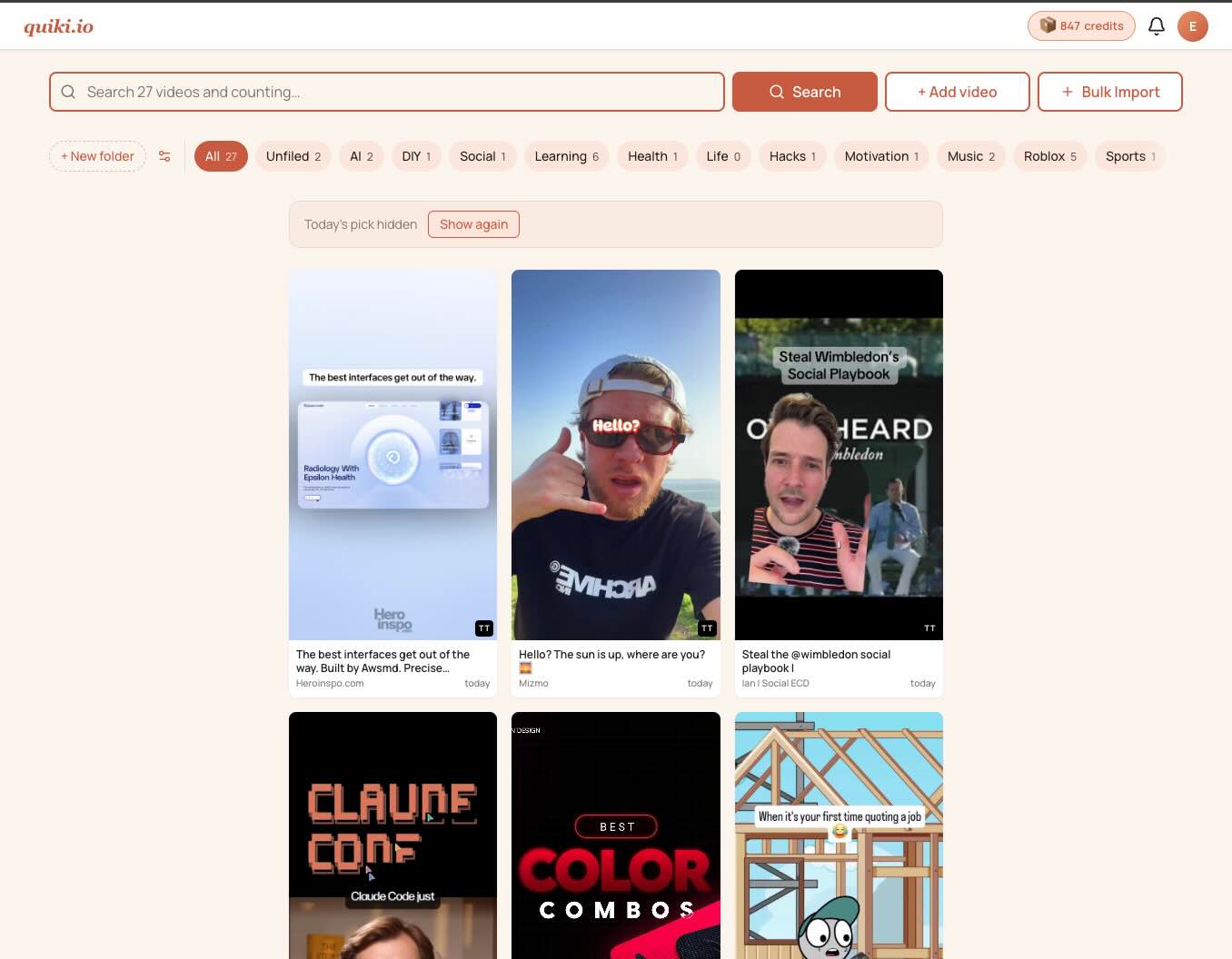
What if you could actually find that video?
Paste the URL. Quiki does the rest. Your whole hoard becomes searchable in seconds.
Search by what you remember
Type the music, the creator, the topic, or a phrase from the video. Quiki searches summaries, transcripts, tags, and your own notes.
AI that reads every video
Quiki scans the video, reads TikTok photo posts, and pulls out summaries, themes, and keywords. Nothing to fill in yourself.
Folders that file themselves
Videos land in the right folder automatically. 47 smart categories to start. Add your own and everything stays searchable.
TikTok, YouTube, and Instagram
One library for all three platforms. TikTok videos and photo posts, YouTube with full transcript search, and Instagram Reels.
Three steps. Your whole hoard, searchable.
No tagging. No naming conventions. Just paste and search.
Add
Paste a video URL or bulk import a list. Works with TikTok, YouTube, and Instagram (Credits plan).
Analyze
Quiki scans the video, generates a summary, extracts keywords, and files it into the right folder. Nothing manual.
Search
Type what you remember. Quiki searches summaries, tags, transcripts, and your own notes across every saved video.
Two ways to get your saved videos into Quiki
Add one video at a time, or bring your whole saved collection across in a single import. Either way, Quiki files and organizes everything for you.
Copy and paste a link
Copy the share link from any TikTok, YouTube, or Instagram video and paste it into Quiki. Within seconds it is scanned, summarized, and filed into the right folder.
Quiki runs in any browser, including the one on your iPhone or Android. So you can tap Share → Copy link inside the TikTok or Instagram app and paste it straight in — no app to install.
Import all your saved videos
Already have hundreds of saved or liked videos? Bring the whole lot across in one go using your TikTok or YouTube data export. Quiki organizes every video into folders automatically, so your back catalogue becomes searchable in minutes.
Don’t worry — we show you exactly how to do this, step by step.
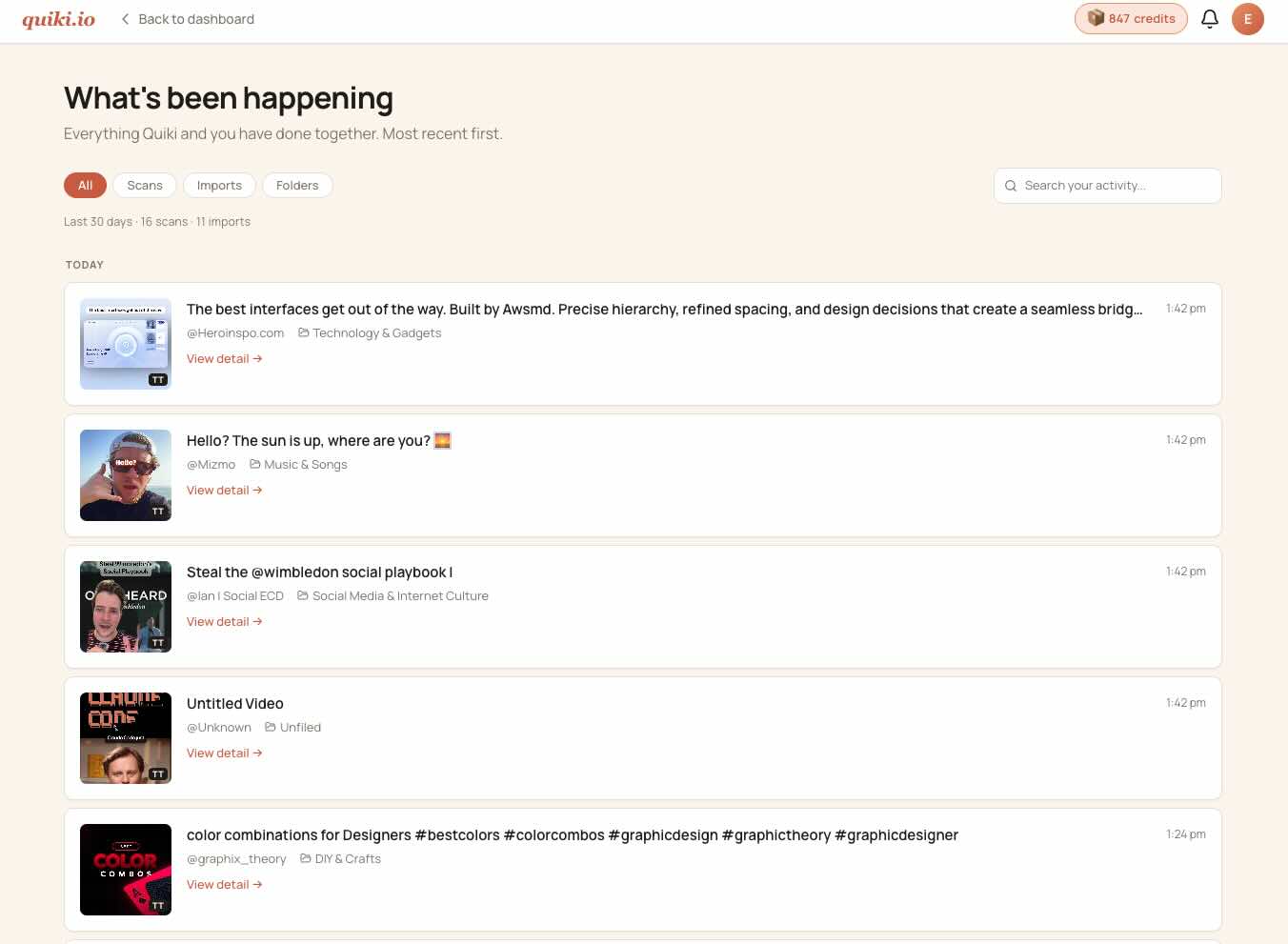
Every scan, every import, on one timeline
The activity feed shows you what Quiki has been doing for you. New scans, auto-filed videos, bulk imports - all in one place, searchable.
Every video, fully decoded
Each scan produces an AI summary, searchable tags, and a full transcript. One click opens the complete picture.
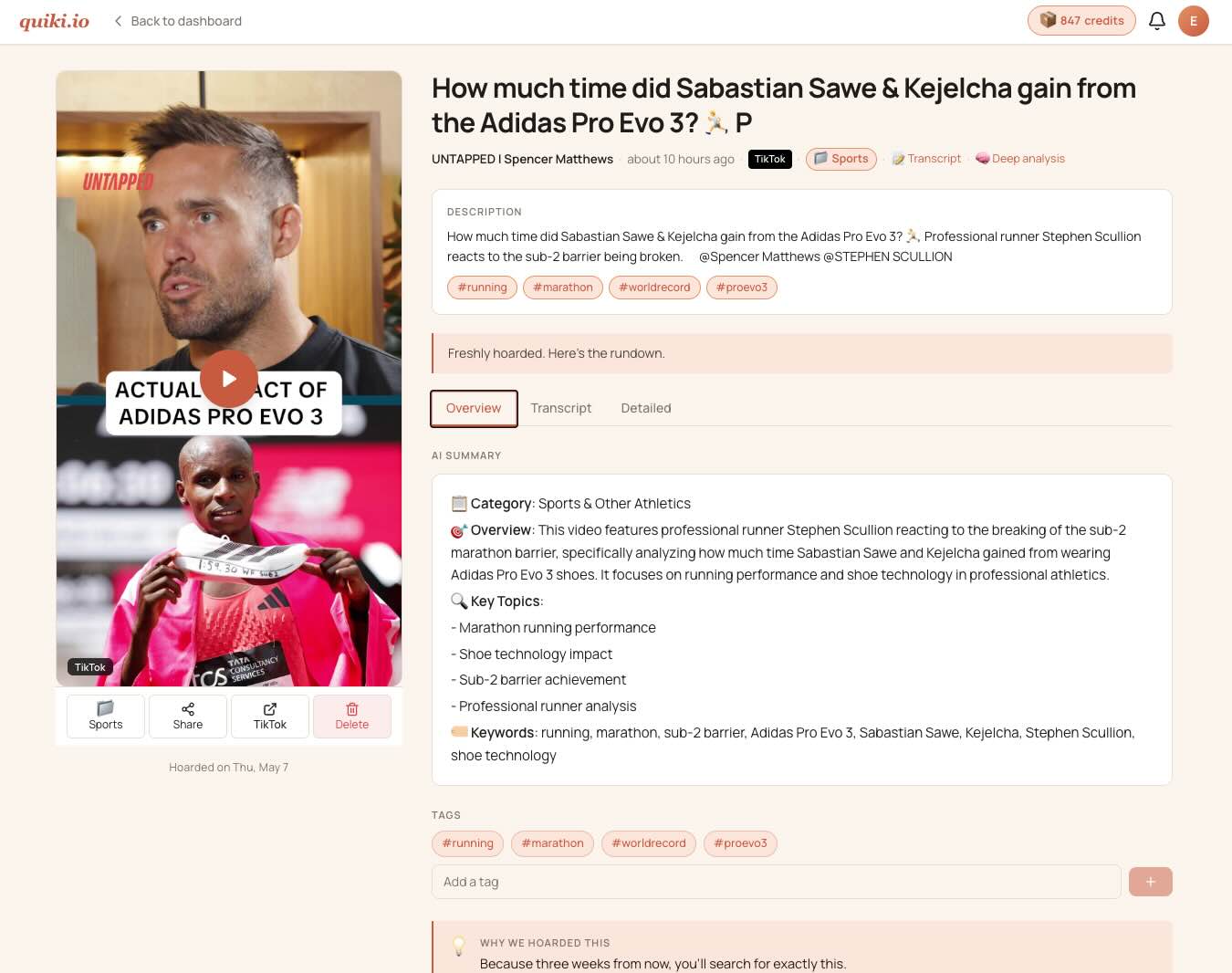
Watch and analyze
Embedded player with an AI summary right beside it. Every word, tag, and note is indexed and searchable.
- - Searchable custom tags
- - Searchable custom notes
- - TikTok photo post analysis
- - YouTube transcript search
Smart organization
Videos are filed automatically. Add your own folders. Search everything at once across all platforms.
- - Auto-filing into 47 categories
- - Full-text search across all videos
- - TikTok, YouTube, and Instagram in one library
Three tabs, one source of truth
Click through to see what each tab gives you on the video detail page.
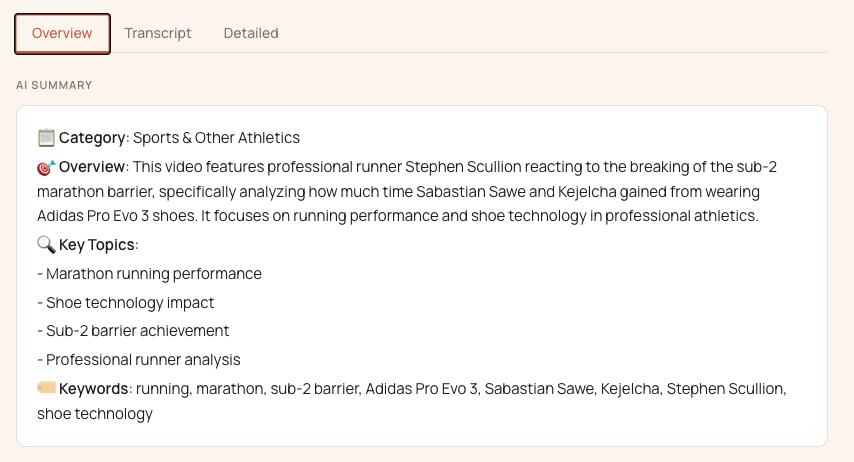
A quick AI summary, sentiment, and the tags Quiki extracted from the video.
People who found their lost videos
From recipe collectors to marketing agencies, the hoard is finally searchable.
"I finally found that pasta recipe from 2019. My marriage is saved."
"Saved 847 TikToks 'for later'. Quiki helped me admit I have a problem."
"My saved videos folder was a cry for help. Now it's organized."
"Found the workout video I saved 3 years ago. Still haven't done it, but I found it."
"Finding that one client video from 6 months ago was painful. This problem has been solved with Quiki in seconds."
"Managing 12 clients means a LOT of saved videos. My team actually knows where stuff is now."
Programmatic video research for your AI agents
Quiki exposes a Model Context Protocol (MCP) server so Claude, Codex, OpenClaw, and any MCP-aware agent can scan TikTok, YouTube, and Instagram videos, pull full transcripts, and search your library programmatically. Here is what people are using it for.
MCP access is included with the Credits plan.
Train your AI agents on new knowledge
Got a 10-hour podcast series, a lecture set, or a YouTube channel full of industry expertise you wish your AI knew? Send the URLs to your agent, let it scan each one through Quiki, then task a subagent to extract the key data points into reference files your AI can pull from in future sessions.
Capture sentiment across a population
Whether you are tracking political moods, economic anxiety, or the rise of a new trend, send a batch of relevant video URLs to your agent. It scans them via MCP and the agent aggregates the transcripts and AI summaries into a sentiment report you can pipe straight into your reports or dashboards. You can always double-check anything in the Quiki UI later.
Teach the teacher
Bringing a new AI tutor up to speed on a topic you need to learn? Hand it a curated list of YouTube explainers, university lectures, or expert breakdowns. The agent scans, extracts the concepts, and writes itself a study guide. By the time you start asking questions, it already knows the material.
Plan meals from the videos you actually want to cook
Half your recipe inspiration lives as short-form video on TikTok or Instagram. Send the week’s saved links to your agent, let it pull ingredients and steps from each, then ask it to build a meal plan and a shopping list. Different from a recipe app: this is the videos you picked.
Brief your creative team’s AI on what is trending
Creative AIs go stale fast because trends move daily. Have your agent pull this week’s top-performing videos in your client’s niche, extract the working hooks, formats, and tropes into a rolling brief file, and your creative AI reads that brief on every draft. You ship work that feels of-the-moment without anyone scrolling for hours.
Verify before you amplify
Viral video claims need fact-checking, not retweets. Newsrooms and brand-safety teams point their agents at suspect URLs, get back transcripts and metadata, and the agent maintains a claims catalog it cross-references against future scans. Patterns surface that a single-pass human review would miss.
Investor research without the 40 hours of watch time
Finance YouTubers, earnings call walkthroughs, analyst breakdowns. There is signal in there but it is buried in hours of footage. Send the URLs to your agent, let it extract sentiment, claims, and key timestamps into research notes, and your next research session starts where the last one ended.
Pre-vet creators before sponsorship deals
Before signing an influencer, your agent scans their most viral videos for brand-safety signals, audience fit, and content patterns. No manual viewing marathon, no surprises three weeks into the campaign.
All you had to do was paste a URL.
Start free. Pay when you go deeper.
Free is genuinely useful. Credits unlock deep scans and transcripts. No subscriptions required.
Free
For the curious. Try it without a card and build a searchable hoard of TikToks and YouTube videos.
- TikTok and YouTube fast scans with AI summaries
- Notes, tags, and folders
- Auto-file and search by keyword or author
- 10 curated videos pre-loaded on signup
- 10 scans per day
Credits
1k / 5k / 10k packs - never expire
For power users. Pay only when you scan, dig into transcripts and AI analysis, and your credits never expire.
- Everything in Free, plus:
- Deep TikTok and YouTube scans
- Searchable timestamped transcripts
- Instagram Reels
- Bulk import your TikTok, YouTube, or Instagram data export
- Frame-by-frame insights and content strategy
- Priority queue. REST API and MCP access.
- 1,000 - 10,000 credits per pack, never expire
Want deep analysis, Instagram Reels, and API access? See Credits on the full pricing page.
Your saved videos are waiting.
Free to start. No credit card. Paste a link and your hoard becomes searchable in seconds.