 quiki.io
Quiki is now in ChatGPT: ask about the videos you saved
The Quiki app is live in ChatGPT. Connect your Quiki account and ChatGPT can search your saved videos, read what they said, and add new ones after you say yes.
The Quiki app is now in ChatGPT. Connect your Quiki account once, and you can ask ChatGPT about the TikToks, Instagram Reels and YouTube videos you saved. It finds them by what they actually said, tells you what is in them, and links you straight back to the original.
Why we built it
A lot of us already ask ChatGPT everything. What is in this recipe, how do I fix that, what was that thing I read. But ask it about a video you saved last month and it draws a blank. It cannot see your TikTok favourites, your Instagram saves or your YouTube Watch Later, and most of what makes a short video useful was said out loud, not written in the caption.
Quiki already turns your saved videos into a library you can search: every video gets an AI summary, and many get a full transcript and analysis. The ChatGPT app simply lets ChatGPT read that library for you.
What you can ask
Start your message with "Quiki" so ChatGPT knows to use it. A few to try:
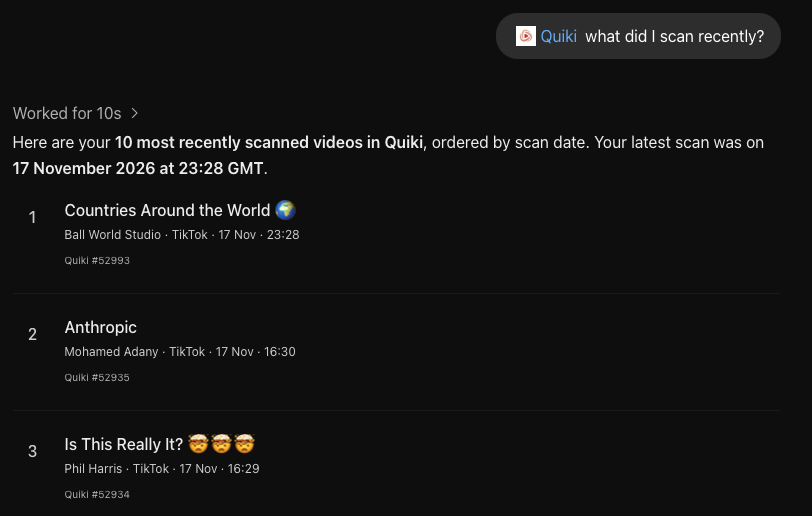
- "Quiki, what videos did I save recently?"
- "Quiki, find the pasta video I saved and show the original."
- "Can Quiki scan this video link? Show me the preview and wait for my confirmation."
- "Quiki, what did that stretching video I saved say to do for lower back pain?"
- "Quiki, what is in my Recipes folder?"
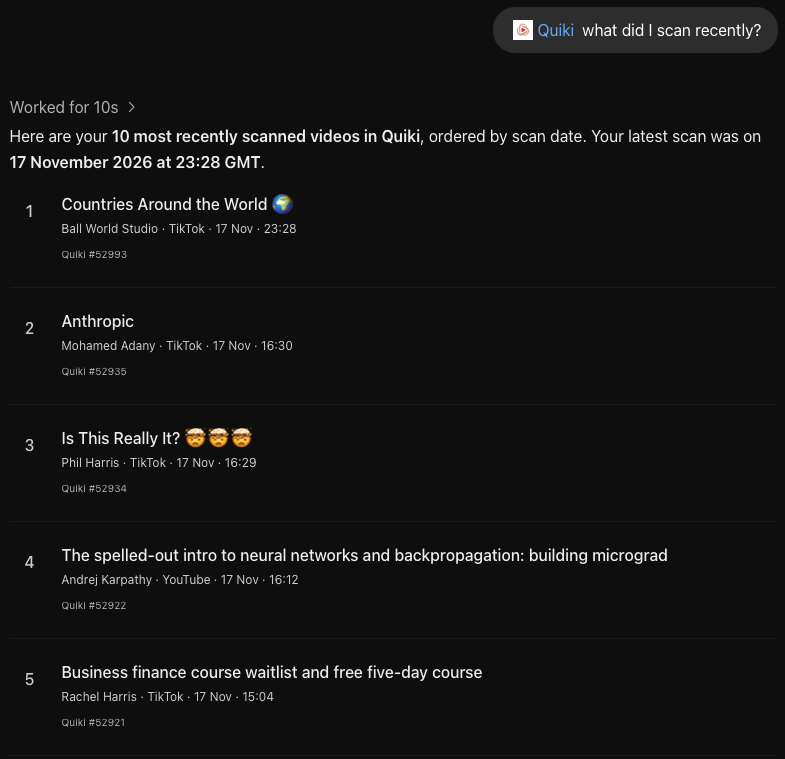
With the app connected, ChatGPT can:
- Search your saved videos and pull up their summaries, transcripts and analysis.
- Browse your folders and see what is in each one.
- Preview a scan of a new link and tell you what it will cost before anything runs.
- Add the video to Quiki, only after you say yes.
- Check on the scan while it runs, then open the finished video.
Adding a new video, with your say-so
Paste a TikTok, Instagram or YouTube link into ChatGPT and ask Quiki to scan it. ChatGPT first shows you a preview: the video, the type of scan and what it will cost. Nothing happens until you confirm.
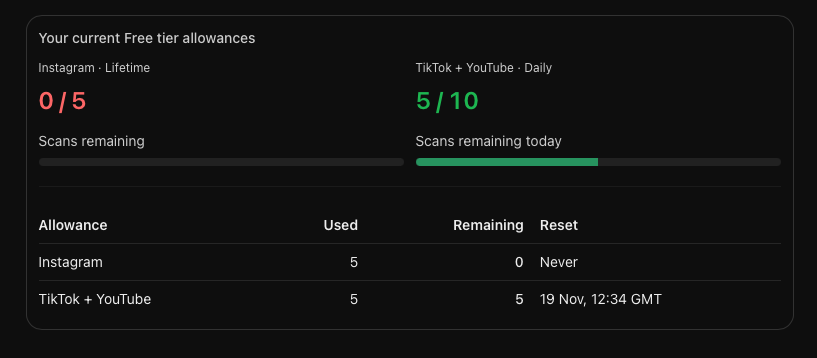
A finished scan uses your free daily scans or your credits, exactly as it would on quiki.io, and a failed scan is free. On the free plan you get quick scans of TikTok and YouTube videos up to your daily limit; Instagram videos and deeper scans with full transcripts need credits. ChatGPT cannot buy credits, delete anything or start a bulk import. If you want to bring in a whole saved list at once, bulk import on quiki.io is still the way to do it.
How to connect it
It takes about a minute, and a free Quiki account is all you need.
- Open the Quiki app in ChatGPT and choose Connect.
- Sign in to Quiki when asked. You do not need to be signed in first: once you sign in, Quiki brings you straight back to finish connecting. New to Quiki? Create a free account on the same screen. With Google or Apple you come straight back; with email, open the confirmation link in the same browser and it brings you back to finish connecting.
- Check what you are allowing. ChatGPT always gets to read your library. Starting scans is a separate permission, listed on the same screen before you allow it.
- Choose Allow. You land back in ChatGPT, ready to go.
Your privacy
ChatGPT only sees the parts of your library it asks for to answer you: titles, summaries, transcripts, analysis, folders and links to the originals. Your private notes stay private. ChatGPT can see that a note matched your search, but never what the note says.
A connection lasts up to 30 days, after which ChatGPT asks you to connect again. You can disconnect sooner at any time in Quiki under Settings, API keys, Connected apps. Our privacy policy has the details.
Free, and no setup
The Quiki app in ChatGPT works on the free plan. Searching and reading your library costs nothing, and you do not need an API key or any technical setup.
If you use Claude or another AI agent, the Quiki MCP server is still there too. It comes with a credit pack and can do a little more, such as filing videos into folders and running bulk imports.
For a step by step walkthrough and more example questions, see how to search your saved videos in ChatGPT.
Your saved videos miss you. Go find them.
Join the creators, marketers, and agencies using Quiki.io to organize their video hoard.