 quiki.io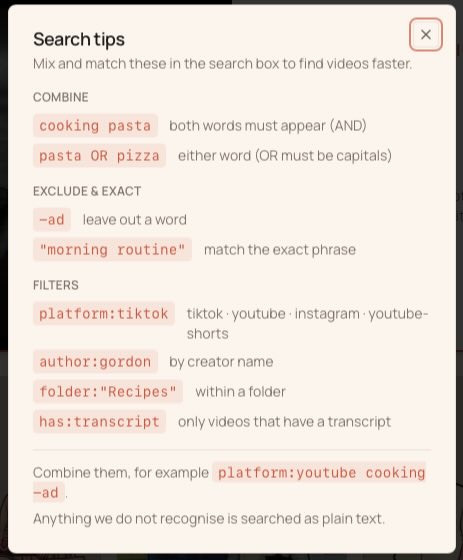
Find Any Video Faster: Quiki's New Search Syntax
Quiki search now understands AND, OR, exclusions, exact phrases, and filters for platform, creator, folder, and transcript. Here is every operator, with examples you can copy.
Once your Quiki library grows past a few dozen videos, scrolling stops working. So we rebuilt search from the ground up. The box above your library now understands a simple, powerful syntax: combine words, exclude them, match exact phrases, and filter by platform, creator, folder, or transcript.
Every operator below is also tucked into the "?" button right next to the search bar, so you never have to remember it. Here is the full set.
Combine words
By default, every word you type has to appear. Type two words and you get only videos that match both.
cooking pastafinds videos that contain both "cooking" and "pasta".
Want either word instead of both? Use a capital OR between them.
pasta OR pizzafinds videos that mention either one.
The OR has to be in capitals so we can tell it apart from the word "or" in a title. You can chain it too, so pasta OR pizza OR risotto widens the net to all three.
Exclude and match exactly
Sometimes the fastest way to find something is to rule things out.
-adleaves out any video containing "ad". Put a minus sign in front of any word to exclude it.
And when only the precise wording will do, wrap it in quotes.
"morning routine"matches that exact phrase, not the two words scattered apart.
You can combine the two to exclude a phrase, so -"social media" filters those videos out entirely.
Filter by what matters
This is where search gets really fast. Filters narrow your library by a specific attribute.
platform:tiktoklimits results to one platform. Works withtiktok,youtube,instagram, andyoutube-shorts.author:gordonfinds videos by a specific creator name.folder:"Recipes"searches inside a particular folder.has:transcriptshows only videos that have a transcript.
Mix and match
The real power comes from combining everything in one line. Every part stacks together.
platform:youtube cooking -adfinds YouTube cooking videos that are not ads.
Stack as many pieces as you like. Filter to a platform, require a couple of words, exclude another, and pull from a single folder, all in one search.
It searches more than titles
Behind the scenes, search now looks through far more than the video title. It reads the description, hashtags, creator name, your own notes, the AI summary, and the full transcript. We also made TikTok transcripts searchable for the first time, so the actual spoken words in a video are now findable alongside everything else.
No syntax to memorize
You do not have to learn any of this to use it. Anything we do not recognize as an operator is simply searched as plain text, so typing a normal phrase still just works. And if you ever want a refresher, the "?" button beside the search bar lists every operator with a live example.
Give it a try on your own library. Once you have searched with a filter or two, the scroll bar starts to feel like a relic.
Your saved videos miss you. Go find them.
Join the creators, marketers, and agencies using Quiki.io to organize their video hoard.